Available now

LumenScan

A private document scanner, made for India

Turn any document into a clean, searchable PDF in seconds. On-device OCR, GST extraction, PDF signing, and a Face ID vault — nothing leaves your phone.

LumenScan offers an auto-renewing subscription. Payment is charged to your App Store or Google Play account; it renews automatically unless cancelled at least 24 hours before the period ends, and you can manage or cancel anytime in your account settings. Terms and Privacy Policy.

9:41

LumenScan

productivity

A private document scanner, made for India

Get crisp, straightened pages from a quick phone photo
Find any scan later by searching its words
Close your books faster
Scan IDs and passports the right way
Open LumenScan

Account

Not required

Analytics

Opt-in & anonymous

Your data

Stays on device

Ads & trackers

Zero

What you get

Built for exactly this — and nothing you don't need.

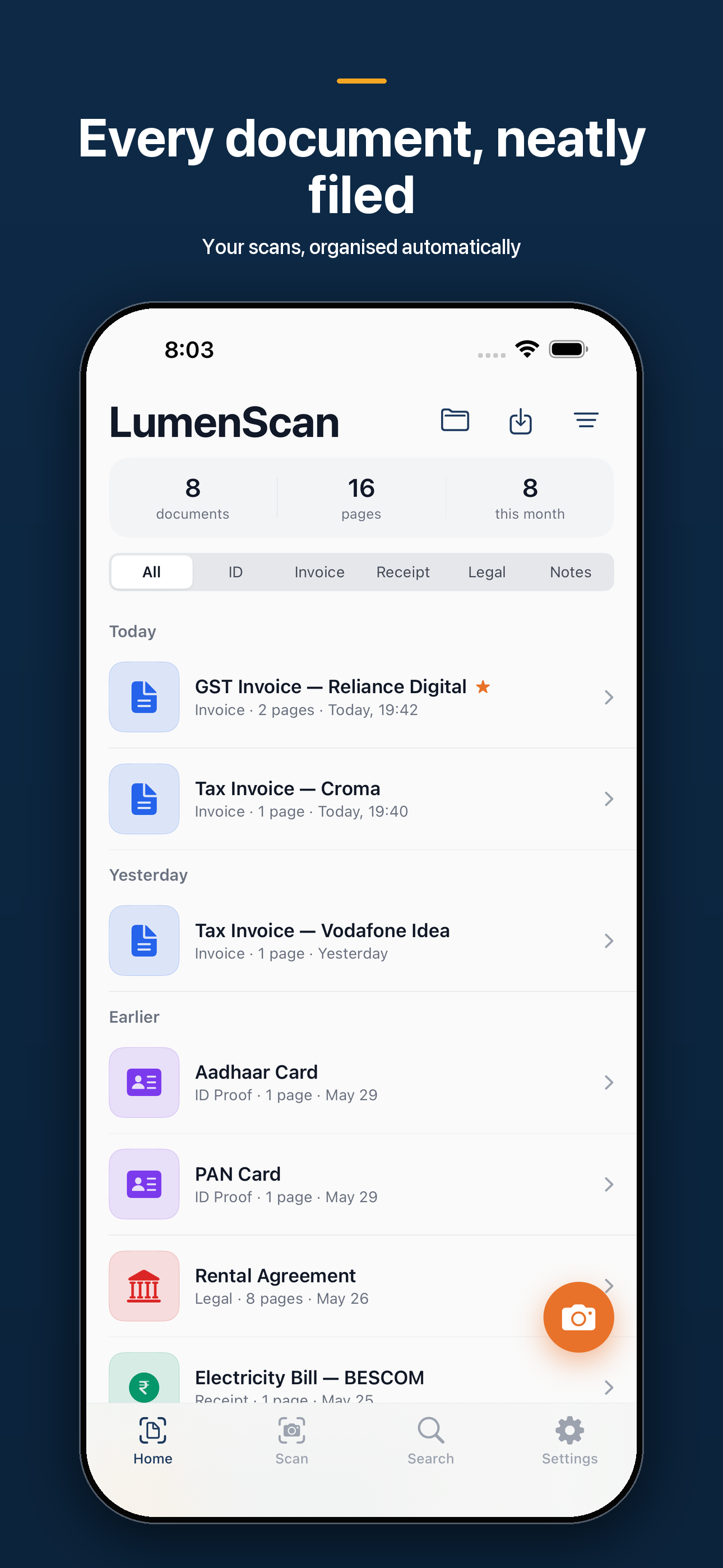
Get crisp, straightened pages from a quick phone photo

auto-capture detects the document edges, fixes the perspective, and a magic clean-up filter wipes shadows and uneven lighting: plus Enhanced, B&W, and Grayscale modes for sharp, readable scans.

Find any scan later by searching its words

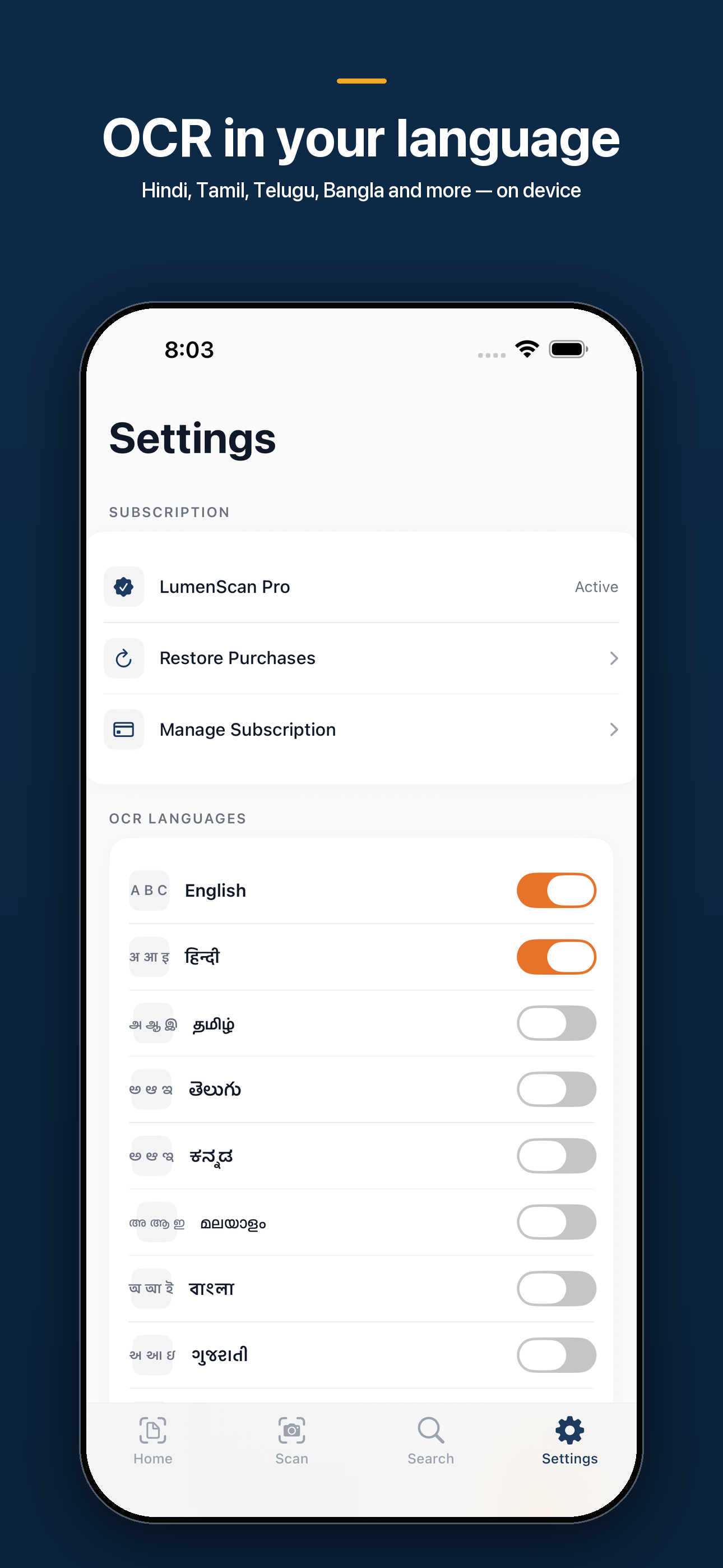
on-device OCR (Apple Vision, accurate mode) reads English, Hindi, Tamil, and Telugu into a searchable text layer: text recognition runs entirely on your phone, no internet and no upload.

Close your books faster

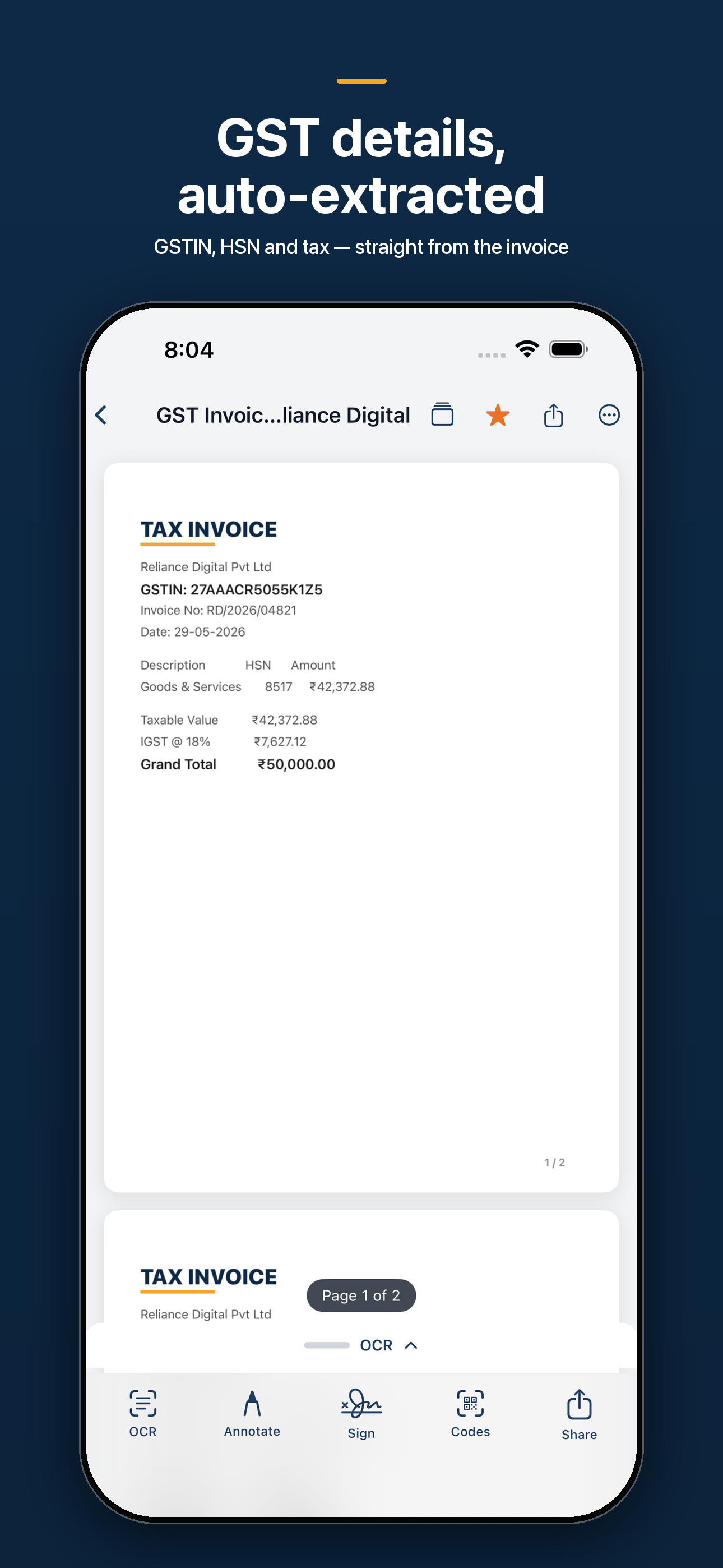
scan a GST invoice or receipt and LumenScan auto-extracts the GSTIN, amount, and vendor, and turns a scanned UPI QR into a one-tap pay link. (GST extraction is a Pro feature.)

Scan IDs and passports the right way

combine an Aadhaar, PAN, or other ID's front and back onto a single clean page, and read a passport's machine-readable zone on-device: no typing, no cloud.

Sign and protect PDFs without leaving the app

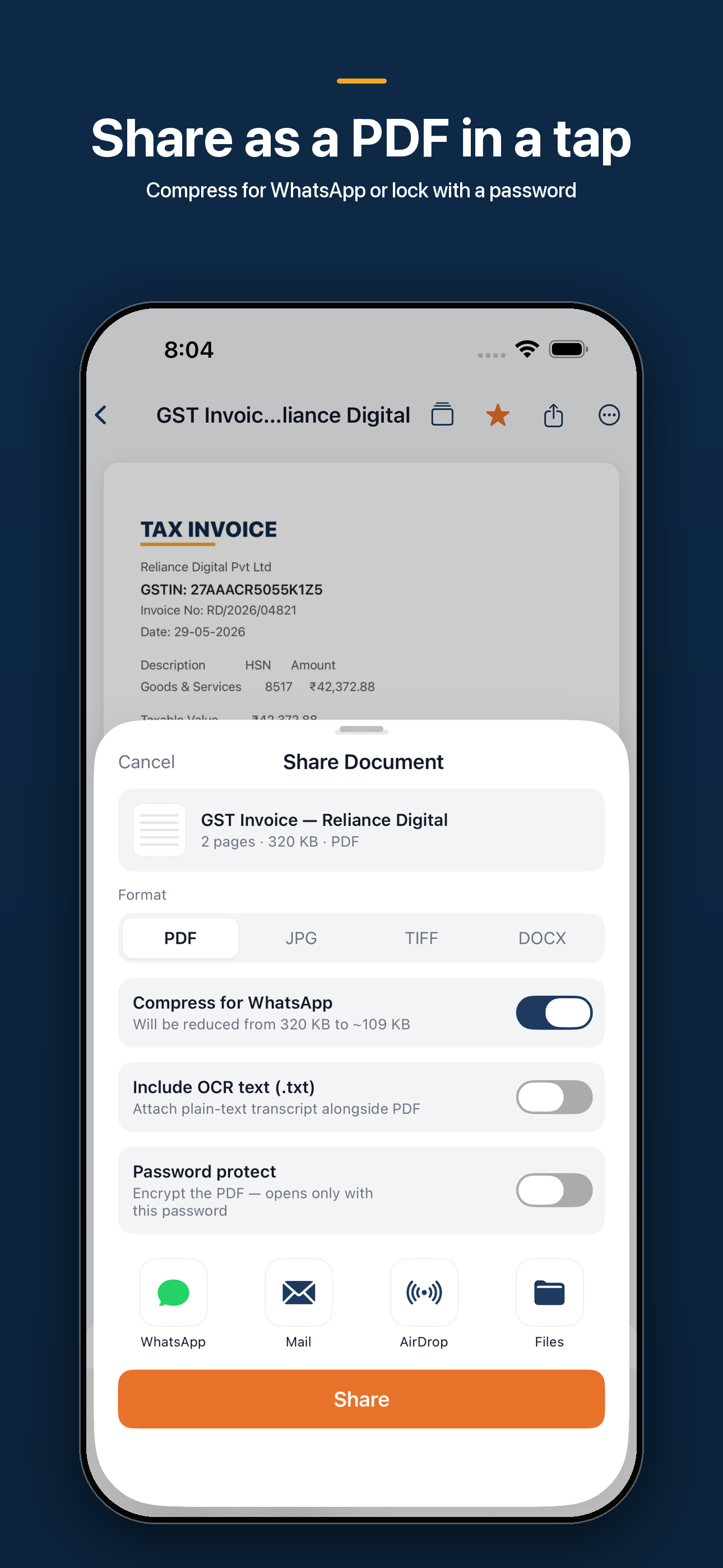
annotate, fill forms, drop a reusable signature, and lock exports with AES password protection. (Annotation and signing are Pro features.)

Share scans in the format anyone needs

export to PDF, JPEG, PNG, or an editable Word (.docx) document built from your scan's OCR text.

Keep documents organized automatically

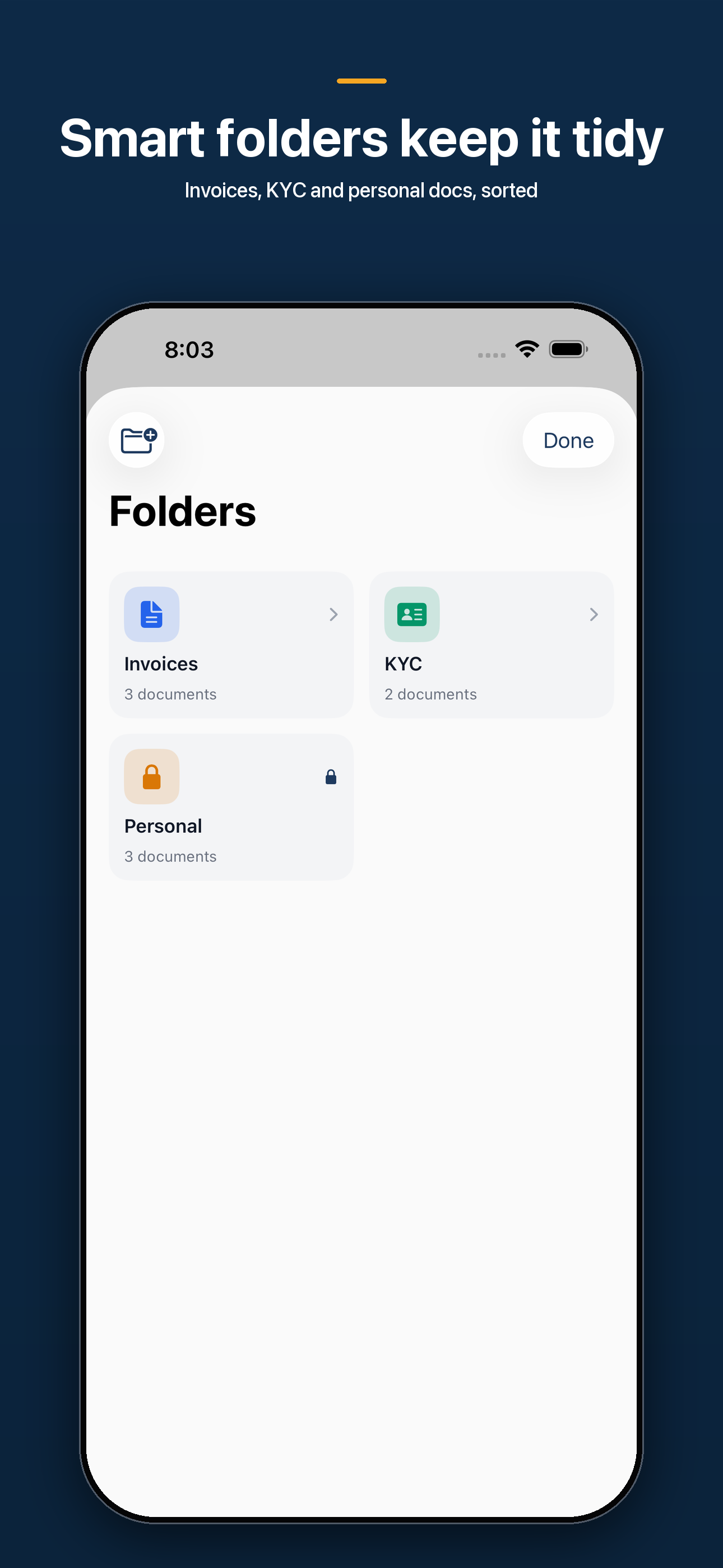
scans are auto-filed into ID, Invoice, Receipt, Legal, and Notes categories with tags, favorites, and full-text search. (Smart Folders are a Pro feature.)

Lock the sensitive stuff down

a Face ID / biometric vault hides private scans, on-device masking blurs Aadhaar and PAN numbers before you share, business cards save straight to Contacts, and GST filing reminders (GSTR-1 on the 10th, GSTR-3B on the 20th) keep you on time: with optional iCloud sync across your Apple devices (Pro).

A look inside

See it in your hands.
LumenScan screenshot 1LumenScan screenshot 2LumenScan screenshot 3LumenScan screenshot 4LumenScan screenshot 5

How it works

Up and running in under two minutes.

  1. 01

  2. 02

  3. 03

  4. 04

A note from the studio

When CamScanner was pulled, millions of people in India lost their scanner overnight — and most replacements either can't read Indian scripts or quietly ship your documents to a server somewhere. That bothered me: your IDs, invoices, and contracts are some of the most personal things on your phone, and they have no business sitting on someone else's computer. So I built LumenScan to do all of it — scanning, OCR, GST extraction, even passport reading — right on your device. Nothing leaves your phone unless you decide to send it.

Questions

The honest answers.

Are my scanned documents uploaded anywhere?

No. Scanning, OCR text recognition, GST and receipt extraction, passport reading, and filing all run on your device. Your documents stay on your phone unless you turn on iCloud sync — which keeps them between your own Apple devices, never on our servers — or until you choose to share or export them.

Does the OCR work offline, and which languages does it read?

Yes — text recognition is fully on-device and works with no internet. It reads English, Hindi, Tamil, and Telugu and writes a searchable text layer into your PDF, so you can find any scan by the words inside it.

Is LumenScan free?

Yes, you can scan for free every day, export to PDF, and organize your documents at no cost. Pro removes the daily scan limit and unlocks GST extraction, fill & sign, password-protected PDFs, Word/PNG export, Smart Folders, and iCloud sync.

How much does Pro cost, and is there a trial?

Pro is available as a monthly or yearly subscription, or a one-time lifetime purchase, with a free trial on the yearly plan. Prices show in your local currency on the upgrade screen, and you can cancel anytime in your Apple ID settings.

How is this different from CamScanner or Adobe Scan?

LumenScan is privacy-first and built for Indian documents: OCR for Indian scripts, native GST invoice and receipt extraction, Aadhaar/PAN masking, and UPI QR detection — all on-device. Other scanners often send your pages to overseas servers to run OCR; LumenScan keeps them on your phone.

Can I lock my private documents?

Yes. A Face ID / Touch ID vault hides sensitive scans behind biometric authentication, with a device-passcode fallback so you're never locked out. You can also mask Aadhaar and PAN numbers before sharing.

Is there an Android version?

LumenScan is live on the iOS App Store today, with an Android build in progress. The privacy promise is the same on both: on-device scanning and OCR, no document content ever uploaded.

Do you show ads or sell my data?

Never. No ads and no data sale. Product analytics are anonymous and never include your document contents — the words in your scans are yours alone.

Your scans, PDFs, and OCR text are stored locally on your device. Scanning, text recognition, ID/passport and receipt parsing all run entirely on-device.

From the journal

Notes on the practice.

  1. 01

    What Documents to Gather Before a Divorce: A Calm Checklist for the Spouse Who Didn't Handle the Money

    What documents to gather before a divorce — a calm, legal checklist of the financial records to copy now, quietly and correctly, before they get hard to find.

    2026-07-12

    7 min read

  2. 02

    How to Save Water-Damaged Documents: Why Your Kitchen Freezer Is the Best Recovery Tool You Own

    Wet paper isn't ruined — yet. How to save water-damaged documents using the 48-hour mold rule, your kitchen freezer, and the same science conservators trust.

    2026-07-12

    7 min read

  3. 03

    What Documents to Save Before Leaving a Job — Because the Day You're Laid Off Is Too Late

    What documents to save before leaving a job: pay stubs, offer letters, reviews, vesting schedules — and why the morning you're laid off is too late to start.

    2026-07-11

    6 min read

  4. 04

    What Documents to Keep After Buying a House — and the Receipts That Could Save You Thousands When You Sell

    What documents to keep after buying a house: the closing papers and renovation receipts that could save you thousands in capital gains tax when you sell.

    2026-07-11

    7 min read

  5. 05

    How to Document Your Apartment's Condition When Moving In — So Your Security Deposit Survives Moving Out

    Learn how to document apartment condition when moving in: the timestamped photo-and-paper trail that wins security deposit disputes months or years later.

    2026-07-11

    7 min read

  6. 06

    How to Scan Documents for an Insurance Claim — Before You Need To

    Learn how to scan documents for an insurance claim before disaster strikes. Why your memory will fail you at the worst moment — and the cued-recall trick that fixes it.

    2026-07-10

    7 min read

  7. 07

    How to Organize Your Aging Parents' Important Documents — While They Can Still Tell You What Each One Means

    A practical guide to organizing aging parents' important documents: scan the paper while they can still explain it, because the meaning disappears before the ink does.

    2026-07-10

    7 min read

  8. 08

    What Documents to Scan When a Parent Dies: A Calm Guide to the Paperwork Nobody Warns You About

    A practical guide to what documents to scan when a parent dies — which papers you must keep as originals, which copies must be certified, and how to stop answering the same question twenty times.

    2026-07-09

    7 min read

  9. 09

    How to Scan Documents for a Visa or Immigration Application (Without Getting Rejected on a Technicality)

    How to scan documents for a visa application without getting rejected on a technicality: legibility, color, file size, and the cropped edges that quietly disqualify you.

    2026-07-09

    7 min read

  10. 10

    How to Scan Warranties and Manuals So You Can Actually Make a Claim When Something Breaks

    Learn how to scan warranties and manuals so a claim is easy when an appliance fails. Capture proof of purchase, model, and serial number before you need them.

    2026-07-08

    6 min read

  11. 11

    How to Scan Thin Paper Without the Text Bleeding Through From the Other Side

    Learn how to scan thin paper without bleed-through: why text shows through translucent pages, and the one-second black-backing trick that fixes it for good.

    2026-07-08

    6 min read

  12. 12

    After You Scan a Document, Should You Shred the Original? A Guide to What Paper You Can Safely Destroy

    Should you shred documents after scanning? A clear guide to which originals you can safely destroy, which paper you must keep, and how to dispose of the rest without inviting identity theft.

    2026-07-08

    7 min read

  13. 13

    How to Scan Glossy Magazine Pages Without the Strange Wavy Lines (Moiré, Explained)

    Learn how to scan glossy magazine pages without moiré patterns — the wavy lines that appear over printed photos — and the halftone science behind why they show up.

    2026-07-07

    7 min read

  14. 14

    How to Organize Tax Documents Digitally So Next April Isn't a Shoebox Scramble

    How to organize tax documents digitally without the annual scramble: the behavioral science of present bias — and a scan-as-you-go system that takes seconds a page.

    2026-07-07

    6 min read

  15. 15

    How to Scan Your Passport Before You Travel — and Store It Somewhere a Thief Can't Reach

    Learn how to scan your passport before traveling so a lost or stolen passport abroad becomes an afternoon at the embassy, not a ruined trip — and how to store the scan safely.

    2026-07-06

    6 min read

  16. 16

    How to Scan Newspaper Clippings Before They Yellow and Crumble: The Chemistry of Acid Paper

    Learn how to scan newspaper clippings before they fade — the real chemistry of why newsprint yellows and crumbles, and how to capture the words before the paper gives out.

    2026-07-06

    7 min read

  17. 17

    How to Check OCR Accuracy: Why the Errors That Matter Are Never in the Words

    How to check OCR accuracy when it matters: why your eyes skip digit errors, where scanned text actually goes wrong, and a quick habit that catches the mistakes that cost you.

    2026-07-05

    6 min read

  18. 18

    How to Digitize Handwritten Family Recipes Before the Cards Fade

    How to digitize handwritten family recipes before the ink fades — and why the stains, margins, and handwriting matter as much as the ingredients do.

    2026-07-04

    7 min read

  19. 19

    How to Back Up Scanned Documents: Why One Copy on One Phone Isn't Safe

    A scan that exists only on your phone is one bad day from gone. Here's how to back up scanned documents with the 3-2-1 rule — and why scanning feels safer than it is.

    2026-07-04

    6 min read

  20. 20

    Why Are Your Scanned Documents Blurry? The Optics Behind a Sharp Scan

    Why are your scanned documents blurry? Usually it's physics, not your phone — focus distance, shutter speed, and shake. Learn the three kinds of blur and how to fix each.

    2026-07-03

    6 min read

  21. 21

    What the Metadata in Your Scanned Documents Reveals — and How to Remove It

    The metadata in scanned documents can reveal your location, device, and edit history — even when the page looks harmless. Here's how to find it and strip it.

    2026-07-03

    7 min read

  22. 22

    How to Reduce a Scanned PDF's File Size Without Making It Unreadable

    Why scanned PDFs balloon to unmailable sizes — and how to reduce scanned PDF file size with the right resolution, color mode, and compression, not blunt force.

    2026-07-03

    7 min read

  23. 23

    How to Scan a Crumpled or Folded Document So It Reads Flat Again

    How to scan a crumpled document so it reads flat: why creases scatter light, the conservator's trick for relaxing paper, and what software can actually fix.

    2026-07-02

    6 min read

  24. 24

    How to Scan Old Handwritten Letters and Cards So the Handwriting Itself Survives

    How to scan old handwritten letters and greeting cards so a loved one's handwriting—not just the words—survives. A guide to preserving the most personal paper you own.

    2026-06-27

    7 min read

  25. 25

    How to Scan Both Sides of an ID Card Onto One Page (Without the Glare)

    How to scan both sides of an ID onto one page: why offices want it that way, how to beat glare on laminated cards, and how to do it privately on your phone.

    2026-06-27

    7 min read

  26. 26

    Should You Scan a Document in Color or Black and White? A Practical Guide

    Wondering whether to scan in color or black and white? Here's how bit depth, ink, and file size decide it — and the one case where color quietly matters.

    2026-06-26

    6 min read

  27. 27

    How to Scan Your Medical Records Before a Doctor's Appointment (So You Don't Forget the Details That Matter)

    Learn how to scan medical records before a doctor's appointment so the dates, doses, and test results are in your hand when stress wipes your memory blank.

    2026-06-26

    7 min read

  28. 28

    How to Scan Your Kids' Artwork So You Can Keep the Memory and Lose the Pile

    Learn how to scan kids' artwork the right way — and the real psychology of why letting the paper go feels like betrayal, and why a good scan finally makes it bearable.

    2026-06-24

    7 min read

  29. 29

    How to Scan a Whiteboard After a Meeting So the Ideas Actually Survive

    Learn how to scan a whiteboard after a meeting so the thinking survives. A practical guide to capturing whiteboard notes before memory and erasers erase the work.

    2026-06-24

    7 min read

  30. 30

    How to Scan Pages From a Book Without Cracking the Spine

    Learn how to scan pages from a book without bent, shadowed text near the spine — the optics behind gutter shadow and the simple fixes that make every page readable.

    2026-06-23

    6 min read

  31. 31

    How to Scan Old Family Photos Before They Fade: A Practical Guide to Beating Chemical Decay

    A guide to how to scan old family photos before they fade — why prints decay chemically, how to spot the warning signs, and how to digitize them while there's still color left to save.

    2026-06-23

    7 min read

  32. 32

    Will Your Scanned Documents Still Open in 20 Years? A Guide to File Formats and Digital Preservation

    Will your scanned documents last? The real threat to digital files isn't decay — it's format obsolescence. How PDF/A, open formats, and copies keep scans readable for decades.

    2026-06-22

    7 min read

  33. 33

    How to Scan Handwritten Notes So They Become Searchable Text

    Learn how to scan handwritten notes into searchable text, why handwriting recognition is harder than printed OCR, and how to write and scan for the cleanest results.

    2026-06-22

    7 min read

  34. 34

    How to Redact a Scanned Document So the Hidden Text Is Actually Gone

    Learn how to redact a scanned document properly. A black box over text often leaves the words readable underneath — here's how to remove sensitive information so it can't be recovered.

    2026-06-22

    7 min read

  35. 35

    What DPI Should You Scan Documents At? A Guide to Resolution and Readability

    Wondering what DPI to scan documents at? Learn why 300 DPI is the quiet standard for text and OCR, when to go higher, and how resolution shapes readability.

    2026-06-21

    7 min read

  36. 36

    What Documents to Scan Before an Emergency: Building a Digital Go-Bag

    A calm, practical guide to the documents to scan before an emergency — which records actually matter, why we keep putting it off, and how to build a digital go-bag in one afternoon.

    2026-06-19

    7 min read

  37. 37

    How to Scan Documents Without Glare: A Practical Guide to Lighting

    Learn how to scan documents without glare or shadows. A practical guide to lighting, glossy paper, and getting phone scans that OCR can actually read.

    2026-06-16

    7 min read

  38. 38

    Are Scanned Documents Legally Valid? What a Digital Copy Can (and Can't) Replace

    Are scanned documents legally valid? Most are — courts, the IRS, and contract law accept clean copies. But a few originals you must never shred. Here's how to tell.

    2026-06-15

    7 min read

  39. 39

    Scanning Is the Easy Part: How to Keep Documents Findable for Years

    Capturing a document takes seconds; finding it in two years is the real test. A practical paperless filing system built around search, light sorting, and upkeep.

    2026-06-11

    7 min read

  40. 40

    How Long to Keep Documents: Building a Retention Schedule You'll Actually Follow

    Wondering how long to keep documents before you shred them? Learn to build a simple personal retention schedule so paper stops piling up and nothing important goes missing.

    2026-06-11

    7 min read

  41. 41

    PDF or Photo? Choosing the Right Format for a Document

    Sometimes a quick photo is fine; sometimes you need a real PDF. Here is how to decide PDF vs photo for documents, and why the format you send quietly says a lot.

    2026-06-09

    6 min read

  42. 42

    Scanning Hindi and Tamil Documents: Getting OCR That Actually Reads the Script

    Most scanner apps turn Indian-language pages into gibberish. Here's why Hindi document OCR fails, and how to scan Hindi and Tamil into searchable text that's actually right.

    2026-06-08

    6 min read

  43. 43

    How to Scan Documents on Your Phone Without Uploading Them Anywhere

    Most scanner apps quietly send your documents to a server. Here's how to scan documents without uploading them — and why on-device scanning matters for anything private.

    2026-06-08

    5 min read

  44. 44

    How to Scan and Organize Receipts Before They Fade

    Thermal receipts fade to blank in months. Here is how to scan receipts for taxes and expenses, capture the totals automatically, and keep them findable all year.

    2026-06-04

    7 min read

  45. 45

    Document Scanning for Beginners: What Actually Happens to a Page

    New to scanning with a phone? This beginner's guide to document scanning explains the journey from paper to searchable PDF in plain language — no jargon left behind.

    2026-06-01

    6 min read

  46. 46

    Why Going Paperless Usually Fails — and How to Make It Stick

    Most people try going paperless and quietly give up. Here is why going paperless fails, the trap of the perfect system, and a workflow that actually survives.

    2026-05-27

    7 min read

  47. 47

    Why Paper Piles Up: The Quiet Psychology of the Document Pile

    The stack on your desk is not a failure of discipline. Understanding why paper piles up — the real psychology of deferred decisions — is how you finally clear it.

    2026-05-21

    7 min read

  48. 48

    What OCR Actually Does (and the Myths That Confuse Everyone)

    Scanning a page does not automatically make its words searchable. Here is how OCR actually works, why it sometimes fails, and what 'searchable PDF' really means.

    2026-05-15

    7 min read

  49. 49

    How to Scan a Document With Your Phone So It Looks Like a Real Scan

    A phone photo of a page is not a scan. Here is how to scan documents with your phone properly — clean edges, even light, and a flat, readable PDF every time.

    2026-05-09

    7 min read